
Resources
AI automation cost savings: what SMBs actually get back
The real cost of manual work in your business
Every hour your team spends rekeying data, chasing follow ups, and copying information between systems is an hour you pay for twice: once in wages, and again in the revenue that work displaces. Most small business owners can name the busywork but have never priced it. AI automation cost savings start with putting a real dollar figure on that manual work, and for most SMBs the number is larger than expected.
Where AI automation cost savings actually come from
AI automation cost savings come from three measurable sources: reduced labor hours, fewer errors, and faster revenue cycles. Workflow automation connects the software you already use, then completes the repetitive steps between systems without a person in the loop. The savings are not theoretical. They show up as payroll hours you stop spending on administration and deals you stop losing to slow response times.
AI automation: Software that uses artificial intelligence to complete repetitive business tasks, such as data entry, follow ups, scheduling, and reporting, without manual effort.
The savings break into four categories:
- Labor savings: Tasks that took a person 30 to 60 minutes run in seconds. A business automating 20 hours of weekly admin at a $35 loaded hourly rate recovers roughly $2,800 per month.
- Error reduction: Manual data entry produces errors at a rate most teams estimate between 1 and 4 percent. Each error costs time to find, fix, and apologize for. Automation executes the same logic every time.
- Speed to revenue: Leads contacted within 5 minutes convert far more often than leads contacted after an hour. Automated follow up removes the delay entirely.
- Opportunity cost: Staff freed from admin spend that time on billable work, sales calls, or customer service, which compounds the direct savings.
The second number that matters is the payback period: how long the automation takes to return its own cost. For most SMB builds, payback lands between 2 and 6 months, and everything after that is margin.
How do you calculate AI automation ROI?
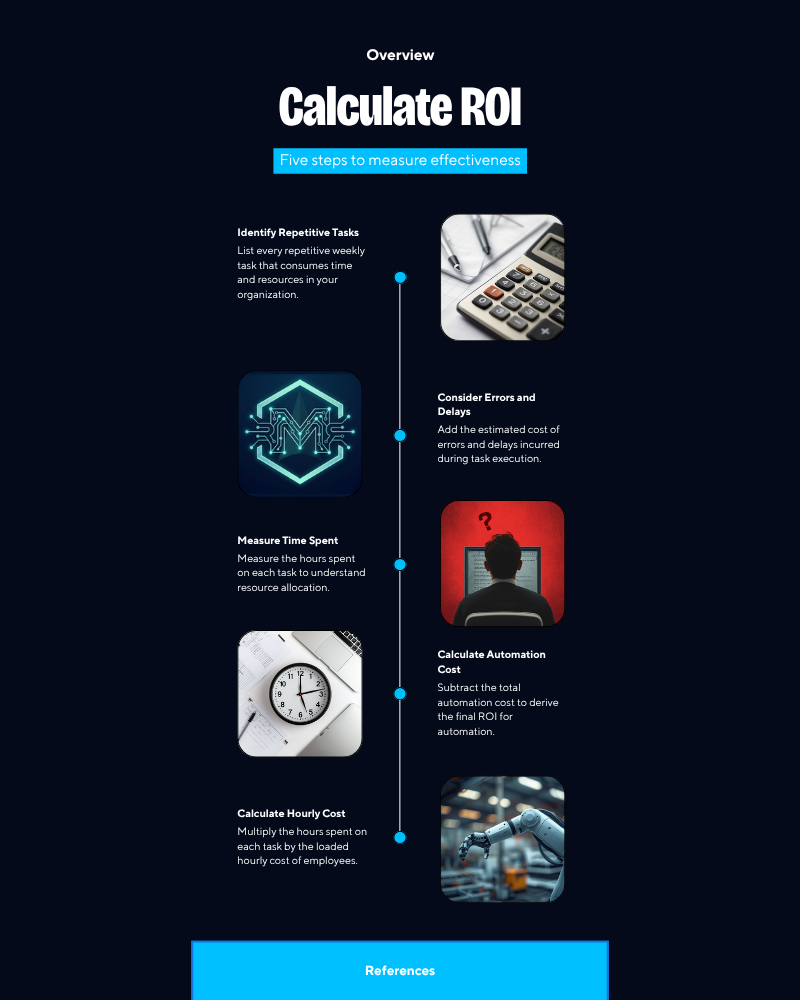
Calculate AI automation ROI by comparing the fully loaded cost of your manual process against the total cost of the automated one over 12 months. The math takes about an hour and most owners have never done it. Here is the process:
- List every repetitive task your team performs weekly. Focus on high volume, low judgment work: data entry, follow up emails, scheduling, invoicing, and report building.
- Measure the hours. Have each person log time for one normal week, or estimate conservatively from calendars and task counts.
- Multiply hours by loaded hourly cost. Use wages plus taxes and benefits, typically 1.25 to 1.4 times base pay.
- Add the cost of errors and delays. Estimate hours spent fixing mistakes and revenue lost to slow response. Hedge low if unsure.
- Subtract the automation cost. Take the annual manual cost, subtract the build cost plus 12 months of software fees, and divide by the build cost to get first year ROI.
A worked example: a team spending 25 hours per week on automatable tasks at a $35 loaded rate carries an annual manual cost of about $45,500. Against a $8,000 build and $250 per month in software, first year net savings are roughly $34,500, a return of over 4 times the investment.
A real example: automated intake at a law firm
A 6 person law firm shows what the numbers look like in practice. Before automation, the office manager spent about 12 hours per week on intake: copying web form submissions into the case management system, sending engagement letters, scheduling consultations, and chasing unsigned documents. New inquiries waited an average of 9 hours for a first response, and the firm estimated it lost 2 to 3 consultations per month to faster competitors.
After Mach Studios built an automated intake system, every web inquiry triggered an instant acknowledgment, a conflict check queue entry, a calendar booking link, and an engagement letter for e-signature. First response time dropped from 9 hours to under 2 minutes. The office manager recovered 10 of those 12 weekly hours, worth about $18,000 per year at her loaded rate. Booked consultations rose by 4 per month. The build paid for itself in under 3 months. The same pattern applies to intake in real estate, patient scheduling in health clinics, and lead response for sales teams.
What this means for your daily operations
The practical impact is that your headcount goes further without anyone working harder. The same 5 person team handles the volume of 7 because nobody is spending afternoons on data entry. Invoices go out the day work completes instead of at month end, which shortens your cash cycle by days or weeks. Leads get answered while competitors are still checking their inbox.
The decision is not whether automation saves money. The math above answers that for any business with more than a few hours of weekly admin. The decision is which process to automate first, and the answer is almost always the one sitting between an inquiry and revenue. Start there, measure for 30 days, and let the savings fund the next build. See the workflows we automate.
If you want this running for your business, Mach Studios handles the build end to end, from process mapping to a working system your team actually uses. Book a free audit and we will scope it for you.
Frequently asked questions
How much does AI automation cost for a small business?
Most done for you automation builds for SMBs fall between $2,000 and $15,000 upfront, plus $100 to $500 per month in software and maintenance. Cost depends on how many systems connect and how complex the logic is. Simple follow up automations sit at the low end, full intake or operations systems at the high end.
How long until automation pays for itself?
Most SMB automation projects reach payback within 2 to 6 months. The math is direct: an automation saving 20 staff hours per week at a $35 loaded hourly rate returns roughly $2,800 per month, so an $8,000 build pays for itself in about 12 weeks at that rate.
Which tasks should a business automate first?
Start with high volume, low judgment tasks: lead follow up, appointment scheduling, data entry between systems, invoice reminders, and report generation. These automate reliably and show measurable savings within the first month. Avoid starting with tasks that change constantly or require human judgment and empathy on every pass.
Key takeaways
- Price your manual work first: hours per week times loaded hourly cost gives the annual figure automation can recover.
- Expect payback in 2 to 6 months on most SMB builds, with first year returns commonly above 3 times the investment.
- Automate the process between inquiry and revenue first, measure for 30 days, and use the savings to fund the next build.